

Which is better? SiteGround or GoDaddy? SiteGround and GoDaddy both offer a wide variety of WordPress web hosting services. They have hosting plans that are suited for experienced and less experienced webmasters. In this comparison of SiteGround vs GoDaddy, we’ll take a look and see which of these hosting providers you should choose for your WordPress websites.
SiteGround vs GoDaddy: Features
If you’re looking for the better premium WordPress hosting features, then SiteGround is definitely the winner. SiteGround now includes their own customized dashboard along with superior data backup and restore, website staging, optimized speed and security plugins, and their own in-house built CDN. While GoDaddy has a number of different options for WordPress hosting, none are currently as impressive as SiteGround when it comes to WordPress features.
Video: SiteGround vs GoDaddy
Check out our video for a quick overview of SiteGround vs GoDaddy.
SiteGround vs GoDaddy: Website Builders
SiteGround now includes their SiteGround Site Builder for quicker and easier WordPress website creation. GoDaddy does have a website builder, but it’s offered in a separate website plan lineup–not their WordPress hosting plans. While GoDaddy’s AI website builder is good for creating quick out of the box sites, if you want WordPress, then you should go with SiteGround. They get the advantage here.
SiteGround vs GoDaddy: WordPress
SiteGround is definitely the winner if you want WordPress website hosting. With SiteGround, you get premium managed WordPress hosting features at a lower cost than other well-known managed WordPress hosts.
The outstanding features you get with SiteGround’s WordPress hosting include their SuperCacher technology for faster websites, security optimizer plugin, speed optimizer plugin, automatic updates—including plugins, automated daily backups, in-house built CDN, and website staging with their GrowBig and GoGeek plans. Through our separate testing, and from my own personal experience as a SiteGround customer, WordPress website speed is among the best there is (see below).


| SiteGround | GoDaddy | |
|---|---|---|
| Preinstallation | ||
| Auto Updates |  |
|
| Auto Data Backups | |
|
| On Demand Backup and Restore | |
|
| Website Staging | |
|
| Optimized Caching | |
|
| WordPress Security | |
|
| Managed WordPress Available? | |
|
GoDaddy offers WordPress hosting among the many products and services they offer. And while their WordPress products are not bad, SiteGround is definitely the winner in this category.
SiteGround vs GoDaddy: eCommerce
You can build a quality eCommerce site with both SiteGround and GoDaddy. Because SiteGround specializes in WordPress hosting, you can easily have a WooCommerce site hosted there. WooCommerce is my choice for an online store platform. You get great functionality and customization. However, it isn’t always the easiest platform for beginners.
GoDaddy also offers many ways to create your online store. The easiest way is to use their GoCentral website builder and add eCommerce functionality via the GoCentral sections. Of course with so many other hosting packages, you can also choose a different method to build your store.
The winner in this category depends on your choice of platform. If you’re a WordPress/WooCommerce user, then go with SiteGround. If you’re looking for the easy way to create an eCommerce site, then choose GoDaddy.
SiteGround vs GoDaddy: Differences
Advantages of SiteGround over GoDaddy:
- Includes Managed Hosting Features
- Superior Customer Support
- SuperCacher Technology for Faster Speed
- Includes WordPress Starter for Faster Site Creation
- Automated Daily Backups
Advantages of GoDaddy over SiteGround:
- Superior Domain Name Management
- More Web Hosting Options
SiteGround vs GoDaddy Details

| Category | SiteGround |
GoDaddy |
Comments |
|---|---|---|---|
| Data Centers |  |
SiteGround has over 170 server locations. | |
| Server Hardware | |
NGINX Server Technology with Solid State Drives (SSDs) | |
| Network | |
High Availability Network with Redundant Electrical Systems | |
| Account Sign Up/Provision | |
3 Clicks to Setup a New Website | |
| Control Panel | |
SiteGround’s customized user dashboard is very easy to use. | |
| Speed and Performance | |
99.99% Uptime | |
| Security | |
Free Let’s Encrypt SSL | |
| Data Backup | |
SiteGround Provides Automatic Daily Backup and 30 Copies Available for Restore | |
| Developer Tools | |
SiteGround is currently supporting PHP 8.4 | |
| WordPress | |
SiteGround provides managed hosting features including automatic updates, data backup, and SuperCacher for added speed. | |
| Website Applications | |
GoDaddy provides 400+ applications via cPanel | |
| Customer Support Response Time | |
See Results Below | |
| Customer Support Issue Resolution | |
||
| Money Back Guarantee | |
30 Days | |
| Price/Value | |
$2.99 – $7.99 mo. |
SiteGround vs GoDaddy: Website Speed
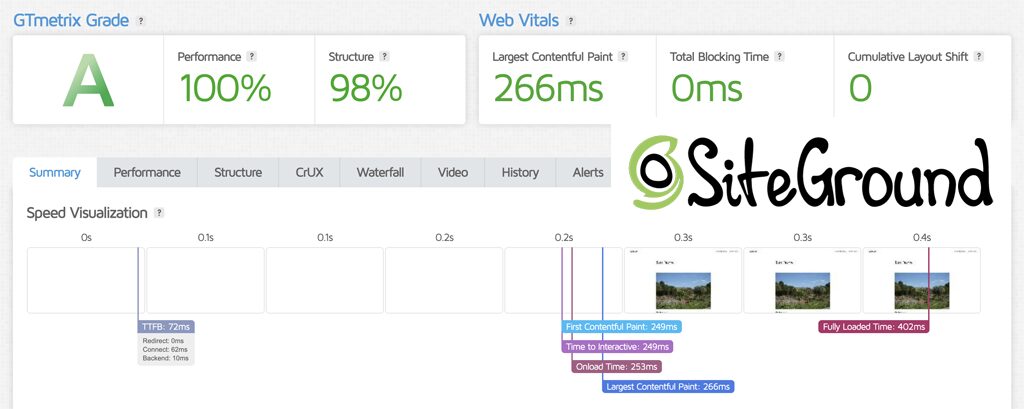
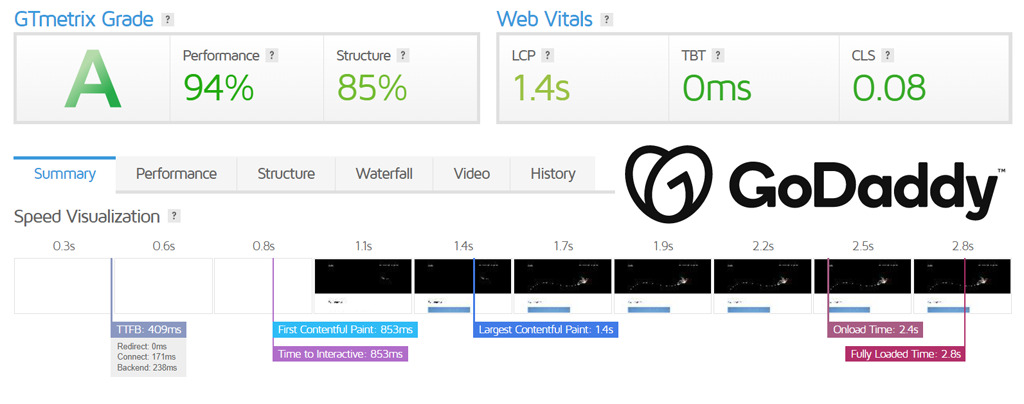
While GoDaddy has improved their website speed, SiteGround still consistently posts faster speed results in our testing. My personal experience using both hosts also concurs with the test results. For website speed, SiteGround is definitely the winner.
See some sample test results from GTmetrix below:
Customer Support Test Results
Currently, I am using both SiteGround and GoDaddy. Performance has been equally good at both places. However, SiteGround is the clear winner in the customer support area. SiteGround’s live chat support is available 24/7 and their support agents are always helpful and courteous. On the other hand, GoDaddy’s chat support is sometime unavailable and the support staff somewhat inconsistent as far as responsiveness.
| Web Host | Morning | Afternoon | Night |
|---|---|---|---|
| SiteGround | 15.8 sec. | 11.9 sec. | 15.7 sec. |
| GoDaddy | N/A | 1 min. 12 sec. | N/A |
If you plan to have quite a few websites online and are going to use GoDaddy as your domain registrar, it would certainly be convenient to also utilize them for web hosting—thereby having one place for managing domain names and your hosting plan. On the other hand, SiteGround does offer some premium features that advanced website owners may prefer including their SuperCacher, CloudFlare CDN, and Git & Staging.

SiteGround
Started Business: 2004
BBB Rating: A+
Data Center Location: U.S., Europe, Asia, Australia, South America
Price: $2.99 mo. – $7.99 mo.
Unlimited Bandwidth: Yes
Unlimited Storage: No (10GB – 40 GB)
Unlimited Email: Yes
Host Multiple Domains: Yes (except StartUp plan)
Hosting Interface: SiteGround Client Portal
Server Uptime: 99.9%
Full Refund Period: 30 Days
Dedicated Hosting Available: Yes
Advantages of Choosing SiteGround:
- Free website transfer.
- Over 170 Server Locations.
- Content delivery network included.
- In-House SuperCacher service included.
- Security Optimizer Plugin included.
- Automatic WordPress Plugin Updates
- SiteGround Custom Dashboard.
- Includes SiteGround’s Site Builder.
- Monthly Performance and Security Reports.
- They offer phone, email, and chat support.
- Fast and responsive live chat support.
Choose SiteGround if:
- You want better customer support.
- You want better WordPress Hosting.
- You want a custom user dashboard.
- You want better hosting features.
- You want better website performance.

Go Daddy
Started Business: 1997
BBB Rating: A+
Data Center Location: N/A
Price: $4.99 mo. – $7.99 mo.
Unlimited Bandwidth: Yes
Unlimited Storage: Yes (except on Economy Plan)
Unlimited Email: No
Host Multiple Domains: Yes (except on Economy Plan)
Hosting Interface: cPanel
Server Uptime: 99.9%
Full Refund Period: 30 Days
Dedicated Hosting Available: No
Advantages of Choosing Go Daddy:
- Very convenient to use their domain name registration services combined with their hosting.
- Your site on Go Daddy can be mobile ready.
- Choose between Linux or Windows operating system.
- Go Daddy is one of the largest and well-known web hosts.
- You can access your account on Go Daddy’s mobile app.
- Go Daddy’s website has been streamlined and now offers easier access to account information.
Choose GoDaddy if:
- You want to use a website builder.
- You need a domain registrar.
How Does SiteGround Compare with Other Web Hosts?
SiteGround vs Bluehost
SiteGround and Bluehost have many similarities within their web hosting offerings. SiteGround’s and Bluehost’s hosting plans are also very affordable…
SiteGround vs DreamHost
SiteGround and DreamHost both offer many different types of web hosting plans. This particular comparison will look at each of their Shared Hosting plans…
SiteGround vs GreenGeeks
GreenGeeks and SiteGround are two excellent web hosting companies. I use both of these web hosts and have had great experiences with each one…
SiteGround vs HostGator
SiteGround and HostGator both offer a similar lineup of web hosting plans. I’ve been a customer of both companies, so I’ve got first-hand experience using their services…
SiteGround vs Hosting.com
Comparing Hosting.com and SiteGround is an extremely close call. They both provide many unique features that provide outstanding web hosting performance. I use…
SiteGround vs InMotion Hosting
SiteGround and InMotion Hosting are two of the best web hosts you can find. As a customer of both of these web hosting companies, I’ve experienced first-hand excellent service and outstanding support…
SiteGround vs InterServer
Here’s our comparison of two impressive web hosts that are both great for multi-website hosting. I personally use both SiteGround and InterServer, so I can give you a first-hand account of the advantages both have to offer…
SiteGround vs Namecheap
While SiteGround and Namecheap both provide great web hosting plans (I use both), they’re definitely suited for different types of website owners…
SiteGround vs Wix
This comparison between a traditional web hosting plan and a website builder package takes a look at SiteGround’s Managed Hosting plans versus Wix’s website builder plans…
SiteGround vs WP Engine
For managed WordPress hosting, these are two of the best choices available. So, let’s see which one is better suited for you…
How Does GoDaddy Compare with Other Web Hosts?
GoDaddy vs Bluehost
Bluehost and GoDaddy are definitely two of the most established and best known web hosts in the industry. Which one should you choose for hosting your websites? Here is our comparison of Bluehost vs GoDaddy that includes…
GoDaddy vs GreenGeeks
Can GreenGeeks web hosting compete with the big dog GoDaddy? Here’s our comparison between these two web hosts…
GoDaddy vs InMotion
How does GoDaddy’s Hosting Plan compare with a Business Hosting plan from a company like InMotion Hosting? If you’re trying to decide, here are some things to keep in mind.
GoDaddy vs InterServer
GoDaddy is certainly much better known than InterServer. But how do their web hosting plans really compare…
GoDaddy vs WP Engine
WP Engine has been the hosting choice for many members of the WordPress community for some time now. Let’s see how these new hosting plans stack up against WP Engine’s fully managed plan…
Recommendation
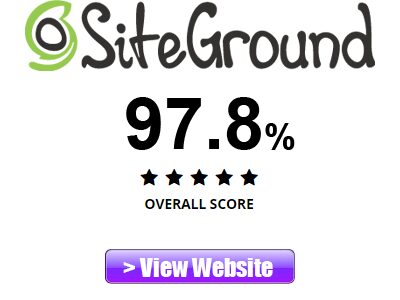
For most websites, in this comparison we would recommend SiteGround. See our SiteGround review ratings below:

- Features: 97%
- Speed and Performance: 100%
- Customer Support: 99%
- Value: 95%
- Started Business: 2004
- Server Uptime: 99.9%
- Money Back Guarantee: 30 Days

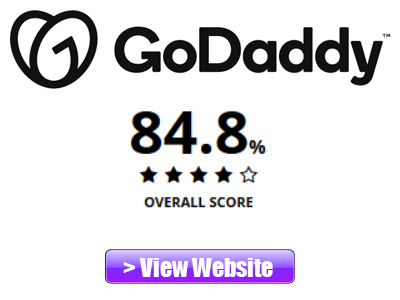
- Features: 82%
- Speed and Performance: 86%
- Customer Support: 81%
- Value: 90%
- Started Business: 1997
- Server Uptime: 99.9%
- Money Back Guarantee: 30 Days