

Now that WordPress.com is offering website plans that include hosting, are they a better option than the other managed WordPress hosting options? In this comparison of WordPress.com vs SiteGround, we take a detailed look at Automattic’s WordPress.com hosting plans against one of the best choices for affordable managed WordPress hosting, SiteGround. Until recently, SiteGround was recommended by WordPress.org. Which one should you choose? Let’s take a look.
WordPress.com vs SiteGround: Details
 |
 |
|---|---|
| Automatic WordPress Installation | One-Click WordPress Installs |
| Global Edge Caching | SuperCacher Technology |
| Global CDN | Cloudflare CDN |
| Free Website Migration | Free Site Migration |
| Staging (Business & Commerce Plans) | Staging (GrowBig & GoGeek Plans) |
| Automatic Data Backups | Automatic Data Backups |
| 99.999% Uptime Guarantee | 99.9% Uptime Guarantee |
| Priority Support (Business & Commerce Plans) | Responsive Customer Support |
WordPress.com vs SiteGround: Differences
Advantages of Choosing WordPress.com over SiteGround:
- Easier To Use Dashboard
- Global Edge Caching
- WooCommerce Plan Available
Advantages of Choosing SiteGround over WordPress.com:
- Less Expensive
- Host Unlimited Websites (Except Starter Plan)
- Faster Website Performance
- Unlimited Email Accounts
- SuperCacher Technology
- Responsive Live Chat Support
- 30 Day Money Back Guarantee
WordPress.com vs SiteGround: Features
When it comes to the entry-level or basic plans, SiteGround has significantly better features in their StartUp plan. Unlike with WordPress.com, you have full use of plugins with speed and security optimization features.
When you get up to the more advanced level plans, it does get closer as WordPress.com provides global edge caching, website staging, increased security features, and more advanced features via JetPack. However, SiteGround also increasing the amount of premium features with their GrowBig and GoGeek upper-level hosting plans. Here, you also get full website staging, on-demand data backups, and more resources.
Overall, when it comes to features, SiteGround is the winner.
WordPress.com vs SiteGround: Website Speed and Performance
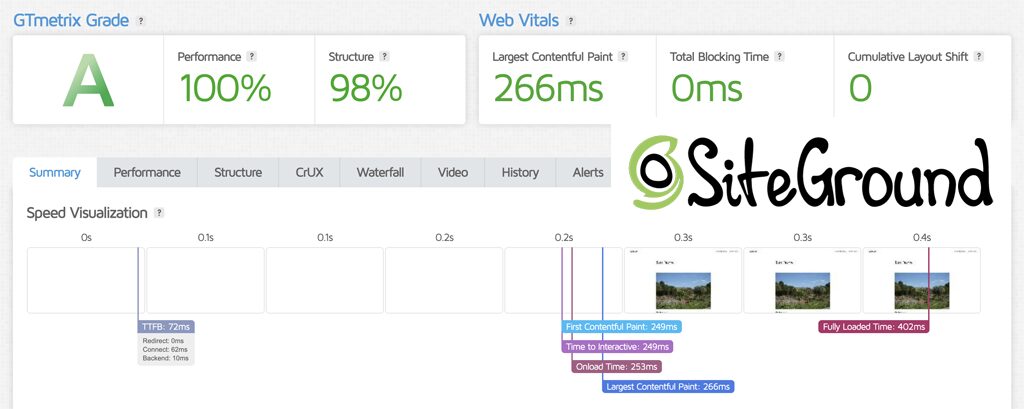
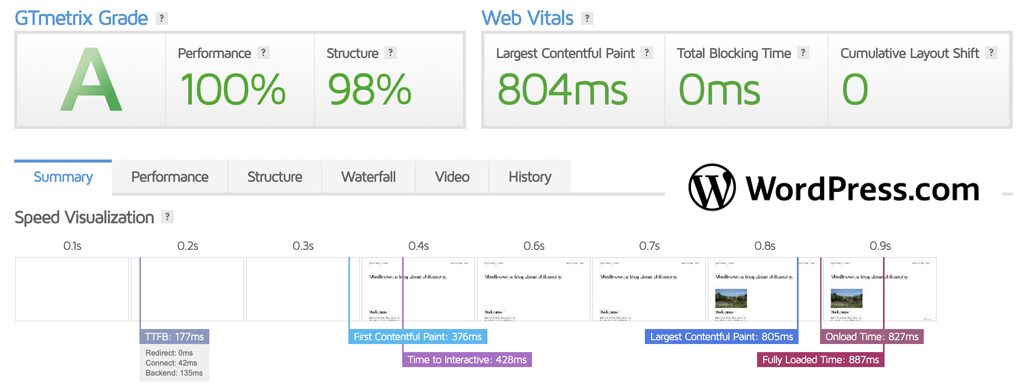
Although WordPress.com was surprisingly good for website speed and performance, in our testing and my personal experience using both WordPress.com and SiteGround, SiteGround was consistently faster and posted better website page loading times and core web vitals. In this category, SiteGround is the winner. See our sample speed test results via GTmetrix below.
WordPress.com vs SiteGround: Customer Support
SiteGround has long been one of the most impressive web hosts when it comes to customer support. Their support agents go through rigorous training before they are allowed to assist customers. While in recent years, live chat support times have increased a bit, they still get high marks for assisting their customers.
WordPress.com also provides helpful support, however they provide automated chat and if you need specific assistance, you’ll need to wait for an email response. Therefore in the support category SiteGround is the winner.

WordPress.com
Started Business: 2005
BBB Rating: A+
Data Center Location:Data Centers: Global
Price: $4 mo. – $45 mo. (Enterprise Plans also available)
Unlimited Bandwidth: Yes
Unlimited Storage: No
Email: Yes
Host Multiple Domains: No
Hosting Interface: WordPress Dashboard
Server Uptime: 99.999%
Full Refund Period: 14 Days
Dedicated Hosting Available: No
Advantages of Choosing WordPress.com:
- You can try it risk free for 14 days.
- Included Premium WordPress Themes
- Guided Website Creation
- Unrestricted Bandwidth
- Global Edge Caching
- Seamless Website Staging to Production
- Automated Datacenter Failover
Choose WordPress.com if:
- You’re newer to WordPress.
- You want easier website creation.
- You only need one site hosted.
- You want unrestricted bandwidth and site visitors.

SiteGround
Started Business: 2004
BBB Rating: A+
Data Center Location: U.S., Europe, Asia, Australia, South America
Price: $2.99 mo. – $7.99 mo.
Unlimited Bandwidth: Yes
Unlimited Storage: No (10GB – 40 GB)
Unlimited Email: Yes
Host Multiple Domains: Yes (except StartUp plan)
Hosting Interface: SiteGround Client Portal
Server Uptime: 99.9%
Full Refund Period: 30 Days
Dedicated Hosting Available: Yes
Advantages of Choosing SiteGround:
- Free website transfer.
- Over 170 Server Locations.
- Content delivery network included.
- In-House SuperCacher service included.
- Security Optimizer Plugin included.
- Automatic WordPress Plugin Updates
- SiteGround Custom Dashboard.
- Includes SiteGround’s Site Builder.
- Monthly Performance and Security Reports.
- They offer phone, email, and chat support.
- Fast and responsive live chat support.
Choose SiteGround if:
- You’re an experienced WordPress user.
- You need multiple website hosting.
- You need a lower cost hosting solution.
- You want live chat support.
How Does WordPress.com Compare with Other Web Hosts?
WordPress.com vs Bluehost
In this comparison of WordPress.com vs Bluehost, we take a detailed look at Automattic’s WordPress.com hosting plans against one of the best choices for affordable WordPress…
WordPress.com vs DreamHost
In this comparison of WordPress.com vs DreamHost, we take a detailed look at Automattic’s WordPress.com hosting plans against one of the most established WordPress hosts long recommended…
WordPress.com vs Hostinger
In this comparison of WordPress.com vs Hostinger, we take a detailed look at Automattic’s WordPress.com hosting plans against one of the best choices for affordable WordPress hosting…
WordPress.com vs Kinsta
In this comparison of WordPress.com vs Kinsta, we take a detailed look at Automattic’s WordPress.com hosting plans against one of the best choices for premium managed WordPress hosting…
WordPress.com vs Rocket.net
Rocket is geared towards those site owners that want ultra-fast, secure, and enterprise performance hosting. WordPress.com is tailored more for…
WordPress.com vs WP Engine
Due to recent events in the WordPress community, this comparison of WordPress.com vs WP Engine focuses on how the hosting plans now available from WordPress.com match up against the longtime…
How Does SiteGround Compare with Other Web Hosts?
SiteGround vs Bluehost
SiteGround and Bluehost have many similarities within their web hosting offerings. SiteGround’s and Bluehost’s hosting plans are also very affordable…
SiteGround vs DreamHost
SiteGround and DreamHost both offer many different types of web hosting plans. This particular comparison will look at each of their Shared Hosting plans…
SiteGround vs GoDaddy
SiteGround and GoDaddy both offer a wide variety of web hosting services. They have hosting plans that are suited for experienced and less experienced webmasters…
SiteGround vs Kinsta
Is Kinsta better than SiteGround? In this comparison of Kinsta vs SiteGround, we compare one of the better premium WordPress hosts (Kinsta) with one of the best known hosts in the WordPress community (SiteGround).
SiteGround vs WP Engine
For managed WordPress hosting, these are two of the best choices available. So, let’s see which one is better suited for you…
Recommendation
SiteGround is better suited for more WordPress hosting situations as they have plans for multiple website hosting, they include premium managed WordPress features, and they provide more responsive customer support.
The one area where WordPress.com is a better choice in our opinion is if you need a WooCommerce website and can afford the Commerce Plan. The specific WooCommerce and online store features included in the plan make it a better fit for eCommerce.
Overall however, in this comparison of WordPress.com vs SiteGround, SiteGround is the winner. See our Review Ratings below.

- Features: 97%
- Speed and Performance: 100%
- Customer Support: 99%
- Value: 95%
- Started Business: 2004
- Server Uptime: 99.9%
- Money Back Guarantee: 30 Days

- Features: 91%
- Speed and Performance: 98%
- Customer Support: 90%
- Value: 89%
- Started Business: 2005
- Server Uptime: 99.999%
- Money Back Guarantee: 14 Days