
If your Core Web Vitals are failing, then your rankings and conversions are likely suffering. Fortunately, you don’t need to be technical to solve the problem. You just need to fix three things: LCP, CLS, and INP. And in this article, I’ll show you how.
What are Core Web Vitals?
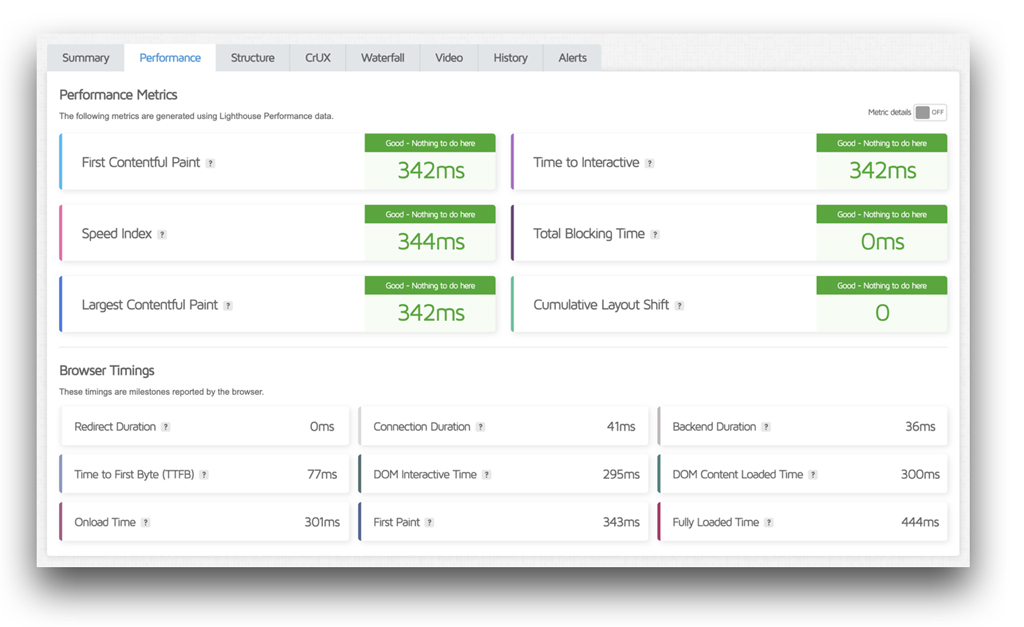
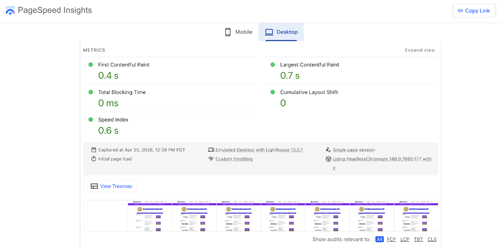
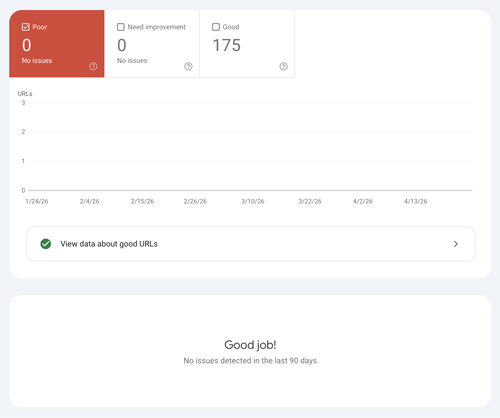
Core Web Vitals are data measurements that Google uses to measure real user experience. They focus on speed (LCP), stability (CLS), and responsiveness (INP). You can use tools such as GTmetrix, Google PageSpeed Insights, and Google Search Console to test and measure your core web vitals.
When analyzing your core web vitals, the important point to keep in mind is that they don’t have to be perfect scores. You just need passing scores.
 Core Web Vitals Benchmarks
LCP (Largest Contentful Paint) – How Fast Your Site Loads
Under 2.5s = Good
2.5s to 4s = Needs Improvement
More than 4s = Poor
LCP measures how long it takes for your main content (or largest visible element) to load. If your LCP is slow, your site will feel slow immediately.
CLS (Cumulative Layout Shift) – How Stable Your Site Looks
Under 0.1 = Good
Over 0.25 = Poor
CLS measures how much your page unexpectedly shifts while loading. For example, when text jumps down when an image loads or you try to click a button and it moves somewhere else. It affects your site’s usability and trust.
INP (Interaction to Next Paint) – How Fast Your Site Responds
Under 200ms = Good
Over 500ms = Poor
INP measures how quickly your site responds after a user interacts. For example when clicking a button, opening a menu, or typing in a form. It reflects how snappy or responsive your website feels.
What’s Causing Poor Core Web Vitals?
1. Slow Hosting/High TTFB
The reality is, if your web server is slow, then your Core Web Vitals are going to struggle no matter what. A slow server will delay your LCP as well as slow everything else down.
2. Large Images and Media
Large images are the biggest killer of LCP. Unoptimized images (like hero images) will really affect your core web vitals and site speed.
3. Render-Blocking Resources
If your site has a lot of CSS and JavaScript loading too early, then you’ll experience slow core web vitals.
4. Too Much JavaScript
Too much JavaScript in general can cause poor INP and slow interactions.
5. Layout Shifts (CLS Issues)
Images without dimensions or not properly sized as well as ads and popups shifting content will result in higher CLS.
 How to Fix LCP (Largest Contentful Paint)
 How to Fix LCP (Largest Contentful Paint)
1. Optimize Your Hero Images
2. Use Next-Gen Format such as WebP
3. Enable Lazy Loading (Except Above the Fold)
4. Improve your Server Response Time
5. Use a Content Delivery Network (CDN)
If you have a lot of images on your site, be sure they are optimized. Using a format like WebP can result in better image compression, smaller images and faster loading. Also, be sure to enable lazy loading.
Make sure your server response time is fast. Using performance hosting can reduce LCP significantly. And, use a CDN—especially if you have site visitors around the world.
 How to Fix CLS (Layout Shift)
 How to Fix CLS (Layout Shift)
1. Set the Width and Height for your Images
2. Reserver Space for your Ads and Embedded Items
3. Avoid Inserting Content Above your Existing Content
4. Use Stable Fonts
CLS is all about keeping your layout stable. So, don’t rely on your platform to size your images. Be sure to set the width and height yourself. Be aware of the space for ads and other embedded items you plan to have on your web pages. Don’t try to jam some new content above your existing content. And, use stable fonts.
 How to Fix INP (Interaction Delay)
 How to Fix INP (Interaction Delay)
1. Reduce JavaScript
2. Remove Heavy Plugins
3. Defer Non-Critical Scripts
4. Optimize Event Handlers
INP measures how fast your site responds when users interact with it. The key to remember here is that too many scrips equals slow interactions. In that regard, do your best to reduce the amount of JavaScript in your website. And, defer your non-critical scripts so they don’t load first. Remove heavy plugins from your site.
Also, optimize event handlers. Granted, this would involve program coding. For non-technical WordPress users, you can do the following to improve INP without coding:
- Use Fewer Plugins
- Use a Lightweight Theme
- Limit Animation and Effects
- Use a Caching Plugin
- Avoid Using Too Many Widgets on Pages
- Keep Your Forms Simple
- Optimize Your Site for Mobile
- Use Better Hosting
 Tools to Measure and Monitor CWVs
 Tools to Measure and Monitor CWVs
To measure and monitor Core Web Vitals, I like to use GTmetrix, Google PageSpeed Insights, and Google Search Console.
Core Web Vitals FAQ
 Core Web Vitals FAQ
What are Core Web Vitals in WordPress?
Core Web Vitals are Google’s UX metrics.
Do Core Web Vitals affect SEO?
Yes. CWVs are a ranking factor.
Why is My LCP so high?
High LCP is usually due to having large images or a slow server.
How do I fix CLS in WordPress?
Set the dimensions of your images and stabilize your layout.
What is INP and why is it high?
INP measures responsiveness. High INP is usually caused by having too much JavaScript.
Can plugins hurt Core Web Vitals?
Yes. Heavy plugins in particular can be especially bad for CWV.
Is hosting important for Core Web Vitals?
Yes. Your hosting affects LCP and TTFB.
 Avoid These Common Mistakes
 Avoid These Common Mistakes
Be sure to avoid these mistakes concerning Core Web Vitals:
- Don’t focus on obtaining perfect scores. Rather, strive for passing scores.
- Don’t install too many optimization plugins.
- Don’t ignore server performance. A slow server can have the biggest impact on CWVs.
- Don’t overload your site with scripts.
When Fixes Aren’t Enough
If you’ve optimized everything and still have bad Core Web Vitals, then your hosting is likely limiting performance. Shared hosting servers can often have resource limits, causing bottlenecks and processing delays. Also, if your server isn’t properly optimized for WordPress, your CWV performance will likely suffer.
Recommended Setup
Here is our Core Web Vitals optimized stack we recommend for better performance:
- Managed WordPress Hosting
- Server-Level Caching
- Content Delivery Network (CDN)
- Optimized Assets
Managed WordPress hosting providers, such as Kinsta, are specifically built for better performance and are optimized for Google metrics. Hosts like Kinsta also provide advanced server caching and a CDN.
Conclusion and Key Takeaways
Above all, here are the keys to keep in mind when addressing Core Web Vitals. Remember that Core Web Vitals measure real user experience. Focus on fixing your LCP, CLS, and INP first instead of trying to do everything. Strive more for passing scores instead of trying to obtain perfect ones. And, remember that your hosting does play a major role in good or bad Core Web Vitals.